
AI Agent Failure & Control Gap Report | Issue #01
Pattern-driven analysis of AI agent failures and the controls that prevent them

By Rav (MrDecentralize) | Business Information Security & Innovation Officer specializing in trust models for AI, blockchain, and global finance | LinkedIn | X
8 min read | February 2026
Pattern: Untrusted tool inputs bypass execution validation
Period: December 2025 - February 2026
Incidents: 8+ confirmed across vendors
Action Required: Jump to audit framework
Executive Snapshot (90 Seconds)
What broke in production this period:
OpenClaw (Disclosed: Feb 3, 2026): 180k GitHub stars in weeks, CVE-2026-25253 (CVSS 8.8) enables one-click RCE, 341 malicious skills (12% of ClawHub marketplace) installing keyloggers
MCP Protocol (Disclosed: Dec 2025 - Feb 2026): 5+ CVE clusters across implementations (aws-mcp-server, git, filesystem), command injection via crafted prompts
Cline CLI (Disclosed: Feb 17, 2026): Supply chain compromise silently installs vulnerable OpenClaw via npm postinstall script
Microsoft Copilot (Disclosed: Jan 2026): Multiple attack vectors via tool-calling, CVE-2025-32711 (CVSS 9.3) zero-click agent hijacking
ServiceNow BodySnatcher (Disclosed: Jan 13, 2026): CVE-2025-12420 (CVSS 9.3) unauthenticated admin API access via hardcoded secrets
Underlying pattern:
Self-hosted AI agents created persistent local attack surface where marketplace extensions, tool protocols, and untrusted inputs execute without validation. Organizations assumed “self-hosted = more secure than cloud.”
Immediate Actions:
Inventory self-hosted AI agents (OpenClaw, local LLMs, MCP servers) deployed in your environment
Audit marketplace/extension installations and disable unapproved access
Verify MCP server authentication is enabled (even for localhost connections)
Check tool execution logs for unauthorized privileged operations
Risk Context:
Exposure: High if you’ve deployed self-hosted agents or enabled MCP servers
Impact: RCE, credential theft, lateral movement from developer workstations
Urgency: OpenClaw actively exploited, MCP CVEs patched but adoption growing
Estimated effort: 2-4 hours for initial inventory + 8-16 hours for control implementation
Risk Posture:
Adoption spike: OpenClaw 180k GitHub stars in 3 weeks (Feb 2026)
Attack surface: 8 CVEs across 6 vendors in 3-month period
Market response: Limited (no CISA KEV listing, most security teams unaware)
Is This Pattern Relevant to You?
Before investing time in this report, determine if Tool/Execution Boundary pattern applies to your environment:
✅ HIGH RELEVANCE - Read Entire Report:
You’ve deployed self-hosted AI agents (OpenClaw, Auto-GPT, LangChain, custom frameworks)
You use MCP protocol implementations
Developers use AI-powered productivity tools on workstations with production credentials
You allow marketplace/skill installations on agents
You’re running AI agent platforms with extension ecosystems
⚠️ MEDIUM RELEVANCE - Read Pattern Overview + Controls:
You use enterprise AI agents (Microsoft Copilot, ServiceNow Virtual Agent, Salesforce Einstein)
You’re evaluating self-hosted agent deployments
Developers request AI tool approvals frequently
You’re planning AI agent pilot programs
❌ LOW RELEVANCE - Monitor for Future:
No AI agents currently in environment
All AI tools are fully managed SaaS with no extension capabilities
No plans to deploy self-hosted AI capabilities in next 6 months
Developer workstations have no AI/LLM-powered tools
If LOW relevance: Bookmark for quarterly review. Pattern will become relevant as AI agent adoption accelerates in your organization or industry.
Pattern Overview: Why Tool Boundaries Collapse
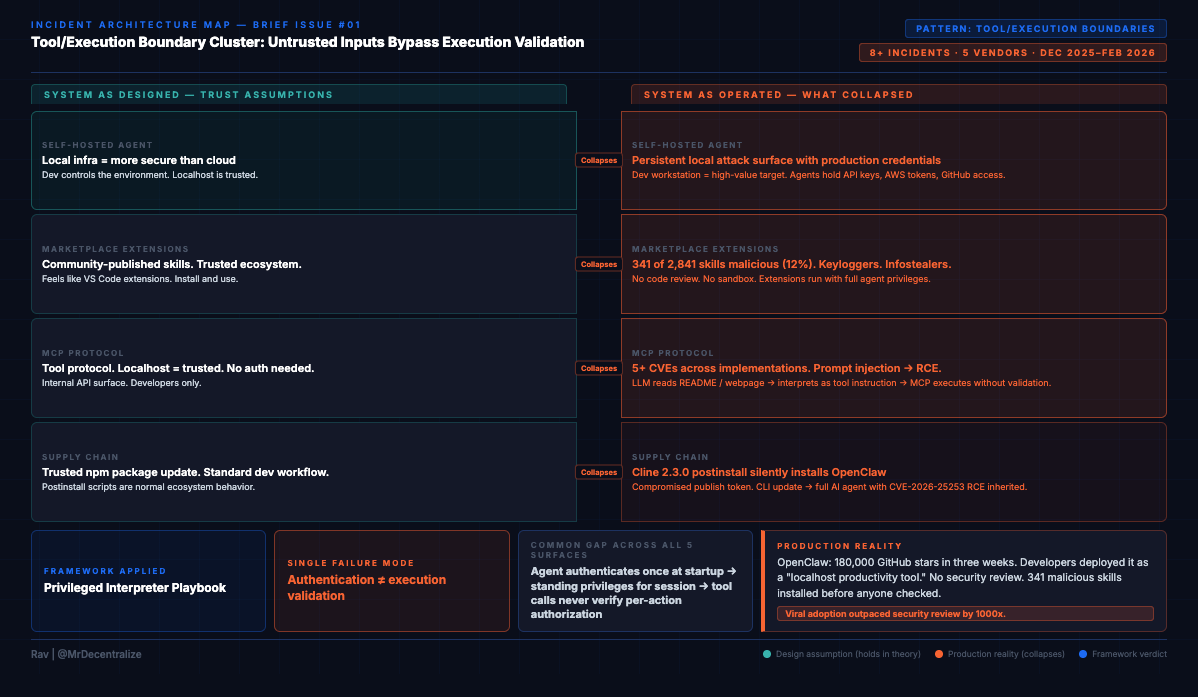
Between December 2025 and February 2026, tool/execution boundaries failed across five distinct attack surfaces. This wasn’t coincidence. It’s the same architectural gap manifesting wherever AI agents execute privileged operations based on untrusted inputs.
The Pattern:
Organizations deploy AI agents with authentication (”agent is authorized”), scope API permissions (”agent has appropriate role”), and run security reviews (”vendor is trusted”). They believe: “The agent is controlled, so tool execution is safe.”
Reality: Authentication ≠ execution validation. When agents execute tools, they rarely verify:
Is this input from a trusted source, or can attackers influence it?
Does the requesting user have permission for this specific action?
Can retrieved content (emails, README files, marketplace extensions) become tool instructions?
Why This Matters Now:
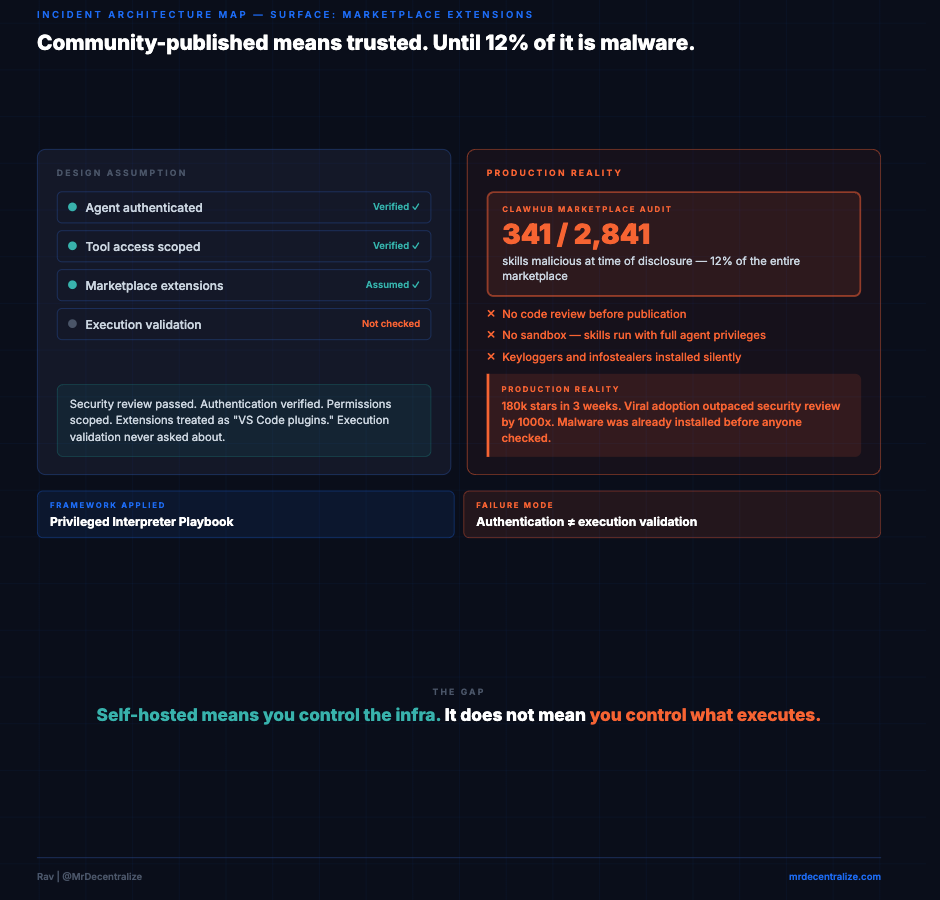
OpenClaw hit 180,000 GitHub stars in three weeks. Developers deployed it as “localhost productivity tool” without security review. By the time researchers found CVE-2026-25253 (one-click RCE) and 341 malicious marketplace skills, it was already on thousands of developer workstations with production credentials.
This is the pattern accelerating: Viral adoption → Localhost assumptions → Tool execution without validation → Production compromise.
How The Pattern Manifested (Five Attack Surfaces):
Marketplace Extensions (OpenClaw, Feb 3, 2026)
Untrusted input: Community-published “skills”
Missing boundary: No code review, no sandboxing
Result: 341 malicious extensions (12% of marketplace) execute with full agent privileges
Tool Protocols (MCP implementations, Dec 2025-Feb 2026)
Untrusted input: LLM-interpreted prompts from retrieved content
Missing boundary: No authentication (localhost = trusted), no input validation
Result: 5+ CVEs enabling command injection, credential theft, RCE
Supply Chain (Cline CLI, Feb 17, 2026)
Untrusted input: npm package with compromised publish token
Missing boundary: Postinstall scripts run automatically, no agent installation disclosure
Result: “CLI tool update” silently installs vulnerable AI agent framework
Enterprise Agents (Microsoft Copilot, Jan 2026)
Untrusted input: Email content, retrieved documents
Missing boundary: No separation between “data to read” and “instructions to execute”
Result: CVE-2025-32711 (CVSS 9.3), zero-click data exfiltration via email injection
Virtual Agents (ServiceNow, Jan 13, 2026)
Untrusted input: User requests via email authentication
Missing boundary: Session-level auth, no per-action authorization verification
Result: CVE-2025-12420 (CVSS 9.3), unauthenticated admin operations via agent workflows
The Common Failure:
Across all five: Untrusted inputs bypass tool execution validation. Organizations verify agent authentication, but don’t verify that each tool action is authorized for the specific requesting context.
What This Report Does:
First, we show you the evidence (five incidents proving the pattern is real in production).
Then, we map the mechanism (how the pattern actually works: trust assumptions, control gaps, hidden dependencies).
Finally, we give you the controls (architectural patterns that address the root cause, plus immediate actions for your environment).
The goal: Walk away understanding one pattern, not five incidents. Because this pattern will manifest again next month in whatever agent framework goes viral next.
What Broke in Production
Incident Card #1: OpenClaw Viral Adoption Meets Security Reality
System: OpenClaw (formerly Clawdbot/Moltbot) - open-source self-hosted AI agent framework
Date: Disclosed Feb 3, 2026 (patched Jan 30, 2026)
Failure Mode: Tool/Execution Boundaries + Identity & Credentials
Status: CVE-2026-25253 assigned, malware samples analyzed, active exploitation documented
What happened:
OpenClaw exploded to 180,000+ GitHub stars in weeks. Then security researchers discovered CVE-2026-25253 (CVSS 8.8): one-click RCE via malicious link/URL parameter that leaks primary authentication token. Attacker gains admin control even on localhost-bound instances.
Simultaneously, marketplace analysis revealed 341 malicious “skills” (~12% of ClawHub marketplace) installing keyloggers and infostealers. Additional February 2026 patches addressed SSRF (CVE-2026-26322, CVSS 7.6), path traversal, missing authentication, and information disclosure.
Blast radius:
RCE on developer workstations, credential theft (OpenClaw configs/tokens now targeted by infostealers), lateral movement from compromised dev environments into production systems.
What Security Missed:
Developers treated OpenClaw as “localhost development tool” and didn’t apply production security controls. Marketplace extensions installed without code review because they seemed like “VS Code extensions” or “browser plugins.”
Pattern Insight:
Self-hosted doesn’t mean secured, especially when viral adoption outpaces security review by 1000x.
Trust Model Breakdown:
Vendor Control Gaps:
Missing: Extension code review before marketplace publication
Missing: Sandbox isolation for installed skills
Missing: Security audit before viral growth phase
Impact: 341 malicious skills (12% of marketplace) installed on user systems with full system privileges
Vendor Trust Model Failure: Publishing unvetted third-party code as trusted marketplace, enabling malware distribution at scale
Customer Control Gaps:
Missing: Security review before self-hosted agent deployment
Missing: Production-level controls on “local productivity tools”
Missing: Marketplace extension vetting process
Impact: Developers granted marketplace extensions full system access including credentials, filesystem, network
Customer Trust Model Exposure: Treating self-hosted agent as low-risk without assessing tool execution privileges or marketplace trust model
Incident Card #2: MCP Protocol Implementation Cluster
System: Model Context Protocol (MCP) - Anthropic’s tool-calling standard, multiple implementations
Date: Disclosed Dec 2025 - Feb 2026 (ongoing)
Failure Mode: Tool/Execution Boundaries
Status: Multiple CVEs assigned across implementations, exploit techniques documented
What happened:
Cluster of critical vulnerabilities across MCP server implementations:
CVE-2025-5277 (aws-mcp-server): Command injection via crafted prompts
CVE-2025-66416 (mcp-server-git): SOP bypass to local MCP server, prompt hijacking
CVE-2025-68143 (git server): File read/delete/RCE chains via prompt injection
Additional CVEs in Splunk MCP, MCP Inspector, Framelink Figma implementations
Common pattern: LLM reads untrusted content (malicious README, webpage, document) → interprets as tool instructions → MCP server executes without validation.
Blast radius:
Local file access, cloud credential theft (AWS keys via aws-mcp-server), git repository manipulation, RCE depending on MCP server capabilities.
What Security Missed:
MCP servers treated as “internal APIs” and didn’t validate that tool call requests originated from legitimate agent decisions vs. prompt injection. Authentication often missing because “it’s localhost.”
Pattern Insight:
Tool protocols aren’t just APIs - they’re execution surfaces that inherit LLM interpretation reliability.
Trust Model Breakdown:
Vendor Control Gaps:
Missing: Input validation on tool call parameters
Missing: Authentication requirements (especially for localhost deployments)
Missing: Separation between LLM-generated requests and trusted commands
Impact: 5+ CVE clusters enabling command injection, file system access, credential theft across independent implementations
Vendor Trust Model Failure: Shipping tool protocol implementations without mandatory authentication or input sanitization, treating localhost as trusted by default
Customer Control Gaps:
Missing: MCP server exposure audit before deployment
Missing: Authentication configuration on localhost services
Missing: Monitoring for prompt injection → tool execution patterns
Impact: MCP servers exposed to prompt injection attacks, enabling lateral movement from LLM context to system resources
Customer Trust Model Exposure: Deploying MCP servers with localhost-only security assumptions without validating tool execution boundaries
Incident Card #3: Cline CLI Supply Chain Injection
System: Cline CLI (npm package) → OpenClaw
Date: Disclosed Feb 17, 2026
Failure Mode: Tool/Execution Boundaries (supply chain variant)
Status: Compromised package verified, malicious code analyzed, npm security alert issued
What happened:
Compromised npm publish token used to push cline@2.3.0 with postinstall script that silently installs latest OpenClaw. Stealth distribution vector for already-vulnerable agent framework. Developers installing “CLI productivity tool” unknowingly deployed full AI agent with marketplace access.
Blast radius:
All Cline CLI users who updated to 2.3.0 now have OpenClaw installed, inheriting all OpenClaw vulnerabilities (CVE-2026-25253 RCE, marketplace malware exposure).
What Security Missed:
npm postinstall scripts run automatically. No warning that “CLI tool update” would install “persistent AI agent with internet access and marketplace extensions.”
Pattern Insight:
Supply chain poisoning now directly targets/installs vulnerable AI agents as distribution mechanism.
Trust Model Breakdown:
Vendor Control Gaps:
Missing: Secure credential management for npm publish tokens
Missing: Monitoring for unauthorized package publications
Missing: Postinstall script validation or disclosure
Impact: Malicious package version distributed to all users who updated, silently installing vulnerable AI agent framework
Vendor Trust Model Failure: Credential compromise enabling supply chain attack, lack of publication monitoring controls
Customer Control Gaps:
None (npm install runs postinstall automatically, standard ecosystem behavior)
Impact: Automatic installation of OpenClaw via trusted package update mechanism
Customer Trust Model Exposure: Limited (this is an ecosystem-level trust model, not customer deployment failure)
Incident Card #4: Microsoft Copilot Tool Calling Exploitation
System: Microsoft 365 Copilot, Copilot Studio
Date: Disclosed Jan 2026 (ongoing exploitation)
Failure Mode: Tool/Execution Boundaries + Identity & Credentials
Status: Microsoft acknowledged, CVE-2025-32711 assigned, exploitation documented
What happened:
Multiple attack vectors via Copilot’s tool-calling capabilities:
“Reprompt” single-click indirect prompt injection for data exfiltration
Memory poisoning / recommendation poisoning attacks
AI assistants abused as stealth C2 proxies via browsing/fetch capabilities
CVE-2025-32711 (CVSS 9.3): Zero-click agent hijacking via email retrieval
Blast radius:
Enterprise data exfiltration (OneDrive, SharePoint, Teams, chat logs), credential theft, persistent C2 infrastructure using “legitimate” Copilot infrastructure.
What Security Missed:
Copilot retrieves emails/documents as part of normal operation. Content in those documents can contain instructions the agent interprets as commands. No separation between “data to read” and “instructions to follow.”
Pattern Insight:
Enterprise agents with broad tool access amplify indirect prompt injection from theoretical to production data exfiltration.
Incident Card #5: ServiceNow BodySnatcher (Context)
System: ServiceNow Virtual Agent API / Now Assist AI Agents
Date: Disclosed Jan 13, 2026 (patched Oct 2025 for hosted instances)
Failure Mode: Identity & Credentials → Tool/Execution Boundaries
Status: CVE-2025-12420 assigned, vendor advisory published, detailed technical analysis available
What happened:
CVE-2025-12420 (CVSS 9.3): Unauthenticated attackers impersonate any user via email + hardcoded platform secret, bypass MFA/SSO, drive privileged AI agent workflows (create backdoor admin accounts, access financial records).
Included for pattern context:
While this is primarily an authentication failure, it demonstrates how enterprise “virtual agents” amplify auth gaps through privileged tool execution. Same pattern as OpenClaw/MCP but in enterprise SaaS context.
Pattern Insight:
Authentication at agent setup ≠ authorization at tool execution time.
Trust Model Breakdown:
Vendor Control Gaps:
Missing: Per-action authorization verification (relied on session-level auth)
Present: Hardcoded platform secret enabling email-based impersonation
Missing: MFA enforcement at tool execution time
Impact: Unauthenticated attackers could impersonate any user and execute privileged agent workflows
Vendor Trust Model Failure: Shipping agent with hardcoded secrets and session-based authorization model instead of per-action verification
Customer Control Gaps:
Missing: Security review questioning agent authorization model
Missing: Audit of whether agents verify caller permissions per-action
Present: Assumption that “ServiceNow is secure” = “agent is secure”
Impact: Deployed enterprise agents without validating authorization boundaries
Customer Trust Model Exposure: Approving agent through vendor trust assessment without auditing specific authorization architecture
Trust & Control Stress Test
Market Assumption:
Self-hosted AI agents are more secure than cloud because “we control the infrastructure” and “it’s on localhost.”
Actual Control Surface:
Who Controls Execution:
Marketplace extension authors: Can inject arbitrary code via “skills” (OpenClaw: 341 malicious out of 2,841)
Content authors: Anyone who can get LLM to read their content (emails, README files, webpages) can inject tool instructions
Supply chain attackers: Can install agents via compromised packages (Cline → OpenClaw silent install)
Network attackers: Can trigger RCE via single malicious link (CVE-2026-25253)
Hidden Trust Assumptions:
Marketplace trust model: No code review, no sandboxing, installations trusted by default
Tool protocol security: MCP servers assume localhost = trusted, no authentication
LLM interpretation reliability: Assumes LLM can distinguish “data” from “instructions” (it cannot)
Developer workstation posture: Assumes dev machines are lower-value targets (false when agents have prod access)
Identity Boundary Collapse:
Agent authenticates once at startup, then has standing privileges for entire session
Tool calls don’t verify requesting user authorization (inherited from agent’s service account)
Marketplace extensions run with agent’s full privileges (no privilege separation)
Authorization Control Gaps:
LLM decides which tools to call based on prompt interpretation (probabilistic, not deterministic)
No confirmation gate before executing privileged operations
“The agent wouldn’t do that” replaces “cryptographic verification prevents that”
Stress Test Conclusion:
Self-hosted infrastructure ≠ self-secured execution. Tool boundaries collapsed when viral adoption (180k stars in weeks) outpaced security review by 1000x.
Control Expectation vs. Operational Reality
Control expectation:
Before executing any tool action, the system verifies:
Tool input is sanitized and validated
Requesting user/agent has authorization for this specific action
Tool execution is sandboxed from system-level access
Tool outputs are treated as untrusted data, not instructions
Observed Control Failures:
OpenClaw marketplace:
❌ No code review before skill installation
❌ Skills run with agent’s full privileges
❌ No sandboxing (skills can access filesystem, network, credentials)
❌ 12% of marketplace = malware (341/2,841 skills)
MCP implementations:
❌ Tool inputs from LLM not validated (prompt injection becomes command injection)
❌ No authentication (localhost = trusted assumption)
❌ File system, git, AWS access without privilege boundaries
❌ Retrieved content (README, webpage) treated as tool instructions
Enterprise agents (Copilot, ServiceNow):
❌ Agent inherits user session but doesn’t verify per-action authorization
❌ Retrieved emails/documents can inject tool instructions
❌ No separation between “data to process” and “commands to execute”
Audit Evidence Requirements:
For marketplace/extension security:
Code review audit trail: Which extensions were reviewed? By whom? When?
Installation logs: Which extensions are installed? Who approved them?
Privilege boundaries: Do extensions run in sandbox or with agent privileges?
Runtime monitoring: Can you detect malicious extension behavior?
For tool execution security:
Authentication logs: Does each tool call verify caller identity?
Authorization checks: Does system verify user has permission for this specific action?
Input validation: Are tool inputs sanitized before execution?
Output handling: Are tool outputs treated as untrusted data?
Control Hardening Roadmap:
Immediate (within 1 week):
Inventory all self-hosted agents and MCP servers
Disable marketplace/extension installations until vetting process exists
Add authentication to all MCP endpoints (even localhost)
Monitor for unexpected tool executions
Short-term (within 1 month):
Implement extension code review process
Add per-action authorization verification
Sandbox tool execution environments
Deploy runtime monitoring for anomalous tool patterns
Long-term (within 1 quarter):
Implement least-privilege tool access model
Separate agent privileges from user privileges
Add confirmation gates for high-risk tool operations
Establish tool execution audit trail
Business Impact:
Operational disruption: Developer workstation compromise can spread to production systems
Regulatory exposure: GDPR (data exfiltration via Copilot), SOC 2 (access control failures)
Reputational risk: Public CVEs in widely-deployed agents (OpenClaw, Copilot, ServiceNow)
Compliance Impact:
SOC 2 (CC6.1 - Logical Access): Tool execution bypasses access controls
ISO 27001 (A.9.4 - Access Control): No per-action authorization verification
NIST CSF (PR.AC-4 - Access Permissions): Agent privileges don’t align with user permissions
PCI DSS (7.1 - Access Control): Marketplace extensions inherit cardholder data access
Logging & Retention Requirements:
Logs needed: Tool execution logs, extension installation logs, authentication attempts
Retention period: 90 days minimum (SOC 2), 1 year recommended (forensics)
Who needs access: Security team (real-time), auditors (quarterly), incident response (on-demand)
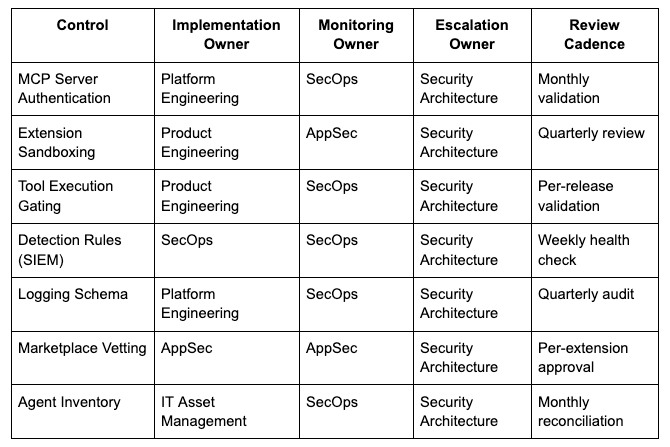
Accountability Matrix: Who Owns What
Pattern: Tool/Execution Boundaries
Cross-Team Handoffs:
Logging Pipeline:
Platform Engineering implements logging schema → SecOps validates required fields present → SecOps deploys detection rules → Platform Engineering maintains log pipeline health
Extension Security:
AppSec defines sandbox security model → Product Engineering implements runtime enforcement → SecOps validates detection of sandbox bypass attempts → AppSec reviews quarterly for model updates
Agent Updates:
Product team ships agent platform update → Platform Engineering deploys to environment → SecOps re-validates detection rules still function → Security Architecture reviews for new attack surfaces
Incident Response:
SecOps detects tool execution anomaly → Security Architecture determines criticality → Incident Response Team executes containment → Platform Engineering implements remediation → AppSec validates fix
Accountability Gaps = Coverage Gaps:
If any role above is marked “TBD” or lacks clear assignment:
Control implementation will stall
Monitoring will be inconsistent
Detection will degrade silently
Incident response will be delayed
Action Required: Assign all roles within 2 weeks of reading this report. Document assignments in security governance repository. Review assignments quarterly for organizational changes.
Architectural Patterns Emerging in Response
Pattern Card #1: Tool Execution Gating
Design Pattern:
Before executing any tool action, require explicit user confirmation for privileged operations. Separate “what agent wants to do” from “what agent is allowed to do.”
Risk Mitigated:
Prevents prompt injection from directly triggering privileged actions. Creates human-in-the-loop gate for high-risk operations.
Operational Tradeoffs:
Reduces automation value (user must approve each action). Increases latency. Doesn’t scale for high-volume tool calls.
Baseline Implementation:
Classify tools by risk level (read-only = low, write/delete = high, admin = critical)
Require confirmation for medium+ risk tools
Log all tool executions with user approval status
Allow users to mark specific tools as “always approve” after risk acceptance
Where This Pattern Breaks Down:
Fully automated agents with no human oversight (defeats purpose). Low-risk read-only operations where latency matters more than control.
Implementation Requirements:
Engineering effort: 1-2 weeks for basic implementation
Tools needed: None (application-level logic)
Ongoing cost: UX friction, potential user training
Control Effectiveness vs Effort:
Quick win: ✅ Immediately prevents most prompt injection → tool execution attacks
Effort level: Low-medium (2 weeks engineering)
Effectiveness: High for human-supervised agents, low for autonomous agents
Sustainability Risk:
Confirmation gates are band-aid on architectural issue. Long-term solution requires proper privilege separation and input validation. Don’t rely on confirmation gates as permanent fix.
Pattern Card #2: Extension Sandboxing
Design Pattern:
Run marketplace extensions/skills in isolated sandbox with explicit privilege grants. Extension must request specific capabilities (filesystem, network, credentials), user approves on install.
Risk Mitigated:
Prevents malicious extensions from accessing system resources, stealing credentials, or executing arbitrary code. Limits blast radius of compromised extension.
Operational Tradeoffs:
Complex to implement properly. Browser-style sandbox (WASM, V8 isolates) requires significant engineering. Some legitimate extensions need broad access.
Baseline Implementation:
Define capability model (filesystem-read, filesystem-write, network-http, credentials-read, etc.)
Extensions declare required capabilities in manifest
User approves capabilities on installation (like mobile app permissions)
Runtime enforces capability restrictions
Extensions cannot escalate privileges after install
Where This Pattern Breaks Down:
Legacy agents where re-architecting extension system is prohibitive. Single-tenant environments where extension author = user (still risky).
Implementation Requirements:
Engineering effort: 4-8 weeks for robust implementation
Tools needed: Sandbox runtime (WASM, containers, language-specific isolation)
Ongoing cost: Performance overhead, compatibility issues with existing extensions
Control Effectiveness vs Effort:
Strategic investment: ✅ High effectiveness, high effort
Effort level: High (4-8 weeks)
Effectiveness: Very high (prevents 95%+ of malicious extension attacks)
Solution Landscape:
Commercial: Limited (most agent platforms don’t offer this yet)
Open-source: Browser extension security models (Chrome/Firefox), Deno permissions, WASM sandboxing
Custom build: Required for most agent platforms
Pattern Card #3: MCP Server Authentication
Design Pattern:
Require authentication for all MCP server endpoints, even localhost. Each tool call includes cryptographic proof of caller identity. MCP server verifies caller authorization before execution.
Risk Mitigated:
Prevents unauthenticated access to MCP servers. Ensures tool calls originate from legitimate agents, not prompt injection or external attackers.
Operational Tradeoffs:
Adds complexity to local development setup. Requires key management for localhost services. Breaks existing unauthenticated MCP deployments.
Baseline Implementation:
Generate unique API key per MCP server instance
Agent includes API key in each tool call request
MCP server validates API key before execution
Rotate keys on agent restart or compromise detection
Log all authentication attempts
Where This Pattern Breaks Down:
Air-gapped single-user systems where network access is impossible (still recommended). Temporary development/testing (but never production).
Implementation Requirements:
Engineering effort: 1-2 days per MCP server implementation
Tools needed: None (HTTP authentication, standard libraries)
Ongoing cost: Key management, rotation procedures
Control Effectiveness vs Effort:
Quick win: ✅ High effectiveness, very low effort
Effort level: Very low (1-2 days)
Effectiveness: High (blocks unauthenticated access, foundation for authorization)
Sustainability Risk:
API key authentication is minimum viable, not best practice. Long-term: implement mTLS, RBAC, per-action authorization verification. Don’t stop at API keys.
Pattern Card #4: Content-Based Privilege Separation
Design Pattern:
Separate agent privileges based on content source. Content from untrusted sources (internet, user uploads, emails) cannot trigger privileged tool operations. Only explicitly trusted content can invoke high-risk tools.
Risk Mitigated:
Prevents indirect prompt injection via retrieved content (emails, README files, webpages). Limits blast radius of compromised content sources.
Operational Tradeoffs:
Reduces agent autonomy (can’t take actions based on email content). Requires accurate content source tracking. Difficult to define “trusted” vs “untrusted.”
Baseline Implementation:
Tag all content with source provenance (internal-trusted, user-provided, internet-retrieved)
Define tool risk levels (read-only = any source, write = internal-trusted only, admin = never via retrieval)
Before tool execution, verify content source matches tool risk requirements
Reject tool calls influenced by untrusted content sources
Log all rejection attempts for monitoring
Where This Pattern Breaks Down:
Agents designed to act on external content (customer support bots reading emails). Research agents that need to browse web and take actions based on findings.
Implementation Requirements:
Engineering effort: 2-4 weeks for content provenance tracking
Tools needed: Custom (no standard solutions)
Ongoing cost: False positives (legitimate actions blocked), operational complexity
Control Effectiveness vs Effort:
Strategic investment: Medium effectiveness, medium effort
Effort level: Medium (2-4 weeks)
Effectiveness: Medium (blocks many indirect injections, but edge cases remain)
Solution Landscape:
Commercial: None identified
Open-source: Research projects (no production-ready solutions)
Custom build: Required
Control Addition to the Playbook
1. Self-Hosted Agent Inventory
Test Procedure: Can you list all self-hosted AI agents in your environment (OpenClaw, local LLMs, custom agents)?
Validation Steps:
Scan developer workstations for common agent installations (OpenClaw, Auto-GPT, LangChain deployments)
Check package managers (npm, pip) for agent frameworks
Review IT asset inventory for self-hosted LLM endpoints
Survey development teams for “productivity tools with AI”
Pass criteria: Complete inventory exists, ownership identified, last security review documented
2. Marketplace Extension Audit
Test Procedure: Which agents have marketplace/extension access enabled? Which extensions are installed?
Validation Steps:
For OpenClaw: List installed skills from ClawHub
For browser-based agents: Check installed extensions
For MCP: Enumerate connected MCP servers and their capabilities
Review extension installation logs
Pass criteria: All installed extensions documented, source verified, installation approved through security review
3. MCP Server Authentication
Test Procedure: Do your MCP servers require authentication, even for localhost connections?
Validation Steps:
Attempt unauthenticated connection to each MCP endpoint
Review MCP server configuration files
Test whether
curl http://localhost:PORT/tool-callexecutes without credentials
Pass criteria: All MCP servers reject unauthenticated requests, API keys required, authentication logged
4. Tool Execution Authorization
Test Procedure: When agent executes a tool operation, does it verify the requesting user has permission for that specific action?
Validation Steps:
Test: Have low-privilege user ask agent to perform admin operation
Check: Does agent verify user authorization or only check agent’s own capabilities?
Review: Tool execution logs for authorization verification events
Pass criteria: Agent verifies user authorization per-action, not per-session. Unauthorized requests rejected and logged.
5. Supply Chain Verification
Test Procedure: Can you detect if legitimate packages silently install AI agents (like Cline → OpenClaw)?
Validation Steps:
Review package.json postinstall scripts for unexpected AI agent installations
Scan for recently installed npm/pip packages that added new processes
Monitor for unexpected network connections from CLI tools
Pass criteria: No silent agent installations detected, postinstall scripts reviewed before execution
6. Content Source Provenance
Test Procedure: Can your agent distinguish between trusted internal content and untrusted external content when deciding which tools to execute?
Validation Steps:
Test: Agent retrieves external webpage, does it execute file operations based on webpage content?
Test: Agent reads email from external sender, does it execute privileged operations?
Review: Does agent tag content with source before tool selection?
Pass criteria: Agent restricts privileged tools to trusted content sources, untrusted content cannot trigger high-risk operations
7. Marketplace Extension Sandboxing
Test Procedure: Do marketplace extensions run in isolated sandbox or with agent’s full privileges?
Validation Steps:
Install test extension, attempt to access filesystem outside extension directory
Test: Can extension read credentials/API keys stored by agent?
Test: Can extension make network requests to arbitrary domains?
Pass criteria: Extensions run in sandbox, explicit capability grants required, cannot access system resources without approval
Detection Engineering Additions
Logging Prerequisites:
This detection framework requires the following log fields:
tool_risk_level: Classification of tool operations (low/medium/high/critical)approval_status: Whether user approved the tool execution (approved/denied/none)source: Content provenance (trusted/untrusted_content/external)user_privilege: Requesting user’s privilege level (low/medium/admin)action_privilege: Required privilege for the action being executed
Verification: Does your agent platform log these fields? Detection only works if logging schema exists.
Baseline Detection Rules:
# Unexpected tool executions
agent.tool_call WHERE tool_name IN ('file_delete', 'exec', 'credential_access') AND source='untrusted_content'

# Mass marketplace installations
agent.extension_install WHERE count > 5 AND time_window < 1_hour

# Unauthenticated MCP access attempts
mcp_server.request WHERE auth_status = 'none' AND endpoint NOT IN whitelist

# Privilege escalation via agent
agent.action WHERE user_privilege = 'low' AND action_privilege = 'admin' AND approval_status = 'none'
Behavioral Anomaly Indicators:
Agent making API calls to paste sites (pastebin, hastebin) - potential exfiltration
High-frequency tool calls to same operation - potential automated attack
Tool execution patterns that don’t match user behavior - possible hijacking
Sample SIEM Queries (Splunk):
index=agent_logs action="tool_execution" tool_risk_level="high" user_approval="false" | stats count by user, tool_name
Incident Response Checklist
Trigger Condition: Execute this checklist if any of the following are observed:
Unauthorized marketplace extension installation
Unauthenticated MCP server access attempts
Privilege escalation via agent (low-privilege user executing admin operations)
Confirmed supply chain compromise (malicious package installation)
Phase 1: Immediate Containment (≤1 Hour)
[ ] Disable marketplace extension installations on all agents
[ ] Revoke API keys/credentials accessible to agents
[ ] Isolate affected developer workstations from production network
[ ] Terminate all active agent processes
Phase 2: Investigation (≤24 Hours)
[ ] Pull tool execution logs for past 30 days
[ ] Identify which extensions were installed when
[ ] Check for credential theft (API keys, AWS credentials, GitHub tokens)
[ ] Review network logs for exfiltration indicators (paste sites, webhook calls)
[ ] Scan workstations for secondary malware (infostealers, loaders)
Phase 3: Remediation (≤7 Days)
[ ] Uninstall all unvetted marketplace extensions
[ ] Update to patched agent versions (OpenClaw latest, MCP implementations latest)
[ ] Implement MCP server authentication
[ ] Add tool execution monitoring
[ ] Rotate all credentials that were accessible to agents
Phase 4: Communication & Disclosure
[ ] Escalate to Security Incident Response Team
[ ] Notify affected users within 24 hours
[ ] Conduct data exposure assessment (breach notification requirements)
[ ] Document timeline for audit trail
Coverage Validation: Can You Actually Detect This Pattern?
Answer these questions to determine if you have COVERAGE, not just intelligence:
1. Logging Reality
[ ] We log all required fields (tool_risk_level, approval_status, source, user_privilege, action_privilege)
[ ] Logs collected from ALL agent deployments (production, staging, development, local workstations)
[ ] Log retention meets compliance requirements (90+ days minimum)
[ ] Logs centralized in SIEM accessible to detection team
[ ] Log collection validated within last 30 days
2. Detection Health
[ ] Baseline Detection Rules deployed to SIEM
[ ] Detection validated on test case within last 30 days
[ ] Detection owner assigned: [________________]
[ ] Next validation scheduled: [________________]
[ ] False positive rate acceptable (<5% on this detection)
[ ] Detection alerts route to active monitoring queue
[ ] Detection rule version controlled and documented
3. Environmental Relevance
[ ] We use technologies affected by this pattern (OpenClaw, MCP, self-hosted agents)
[ ] This pattern represents actual risk in our environment (not theoretical)
[ ] We’ve identified specific assets/systems where pattern could manifest
[ ] Risk assessment completed for this pattern: [________________]
[ ] Pattern relevance reviewed quarterly
4. Ownership & Accountability
[ ] Implementation owner identified: [________________]
[ ] Monitoring owner identified: [________________]
[ ] Escalation path documented: [________________]
[ ] Review cadence established: [Monthly / Quarterly / Annual]
[ ] Budget allocated for ongoing maintenance
[ ] Backup owners assigned for all critical roles
5. End-to-End Coverage
[ ] Pattern → Log Source mapping documented
[ ] Log Source → SIEM Collection mapping documented
[ ] SIEM Collection → Detection Rule mapping documented
[ ] Detection Rule → Alert mapping documented
[ ] Alert → Response Playbook mapping documented
[ ] All handoffs between teams identified and documented
[ ] Coverage map reviewed and updated quarterly
6. Telemetry Gap Assessment
[ ] Agent platforms inventory complete
[ ] Log field availability verified per platform
[ ] Collection coverage assessed (prod/staging/dev/local)
[ ] Gaps identified and documented: [________________]
[ ] Gap remediation plan exists with timeline
[ ] Developer workstations included in log collection scope
7. Validation & Testing
[ ] Detection fires on synthetic test case (validated within 30 days)
[ ] Detection rule tested after agent platform updates
[ ] Alert routing tested quarterly
[ ] Escalation path tested annually
[ ] Runbook exists and is maintained
[ ] Response time SLA defined and monitored
8. Documentation & Knowledge Transfer
[ ] Detection rationale documented
[ ] Implementation guide exists
[ ] Troubleshooting guide exists
[ ] Knowledge transfer completed to monitoring team
[ ] Documentation reviewed and updated quarterly
SCORING:
32/32 boxes checked: You have detection COVERAGE
24-31 boxes checked: You have partial coverage with gaps
16-23 boxes checked: You have detection capability but not operational coverage
<16 boxes checked: You have threat intelligence, not detection coverage
If you can’t check ALL boxes in sections 1-5: You have intelligence, not coverage.
Action Required: Identify which boxes remain unchecked. Assign owners to each unchecked item with 30-day completion target. Review this checklist monthly until all boxes checked.
The Pattern
This isn’t unique to OpenClaw or MCP. It’s the same gap breaking across every self-hosted agent deployment.
The pattern I documented in “AI Agents Are Privileged Interpreters” just moved from enterprise SaaS (Copilot, ServiceNow) to developer workstations. Organizations assumed “self-hosted = more secure” because “we control the infrastructure.”
Reality: Self-hosted agents created persistent local attack surface where:
Marketplace extensions installed without code review (341/2,841 malicious in OpenClaw)
Tool protocols (MCP) assumed localhost = trusted (5+ CVE clusters proved otherwise)
Supply chain packages silently install agents (Cline → OpenClaw)
Developer workstations became high-value targets (agents have production credentials)
The trust model that broke: “If it’s on my machine, it’s under my control.”
The architecture revealed: Agents aren’t traditional applications. They’re privileged interpreters where untrusted inputs (marketplace skills, prompt injection, retrieved content) become tool executions without validation.
This is the same pattern that broke enterprise virtual agents (ServiceNow CVE-2025-12420), now accelerated by viral adoption (180k GitHub stars in weeks) outpacing security review by 1000x.

The Reality Check
OpenClaw hit 180,000 GitHub stars in weeks. Developers deployed it as “localhost productivity tool.” Then security researchers found:
CVE-2026-25253: One-click RCE via malicious link
341 malicious skills (12% of marketplace)
Infostealers now targeting OpenClaw credentials
Supply chain packages silently installing it
MCP protocol implementations shipped with 5+ CVE clusters. Command injection. Unauthenticated access. Prompt injection → RCE chains. All affecting tool-calling infrastructure that’s becoming standard for autonomous agents.
Organizations assumed self-hosted = more secure. Reality: Viral adoption created persistent local attack surface before security review could catch up.
The pattern is established: Tool/execution boundaries collapse when untrusted inputs (marketplace extensions, prompts, retrieved content) execute without validation. This happened with enterprise agents (Copilot, ServiceNow). Now it’s happening with self-hosted agents (OpenClaw, MCP). Next it’ll happen with whatever agent framework goes viral next month.
If you’ve deployed self-hosted agents, enabled MCP servers, or allowed marketplace extension installations, the question isn’t whether you’re exposed. It’s whether you can inventory what’s installed before the next CVE cluster drops.
Map your agent attack surface before it maps itself through your production credentials.
If you’re deploying self-hosted AI agents, MCP servers, or marketplace-enabled tools, these are the execution boundaries to validate before viral adoption creates security debt at scale.

About: I map why trust models break at institutional scale. 20+ years securing trillion-dollar banking systems | 6 patents in blockchain and AI.
LinkedIn | X | Newsletter
References and Further Reading
The Verge - “The AI security nightmare is here and it looks suspiciously like lobster” - https://www.theverge.com/ai-artificial-intelligence/881574/cline-openclaw-prompt-injection-hack
TechRadar - “OpenClaw AI agents targeted by infostealer malware for the first time” - https://www.techradar.com/pro/security/openclaw-ai-agents-targeted-by-infostealer-malware-for-the-first-time
The Hacker News - “Critical LangChain Core Vulnerability” - https://thehackernews.com/2025/12/critical-langchain-core-vulnerability.html
AppOmni - “BodySnatcher: Agentic AI Security Vulnerability in ServiceNow” - https://appomni.com/ao-labs/bodysnatcher-agentic-ai-security-vulnerability-in-servicenow
SOCPrime - “CVE-2025-32711: Zero-Click AI Vulnerability” - https://socprime.com/blog/cve-2025-32711-zero-click-ai-vulnerability/
Anthropic - Model Context Protocol Documentation - https://modelcontextprotocol.io
MITRE ATT&CK - AI/ML Threat Landscape - https://atlas.mitre.org
NVD - National Vulnerability Database (CVE references) - https://nvd.nist.gov
Emerging Patterns (Under Observation):
“Retrieved Content → Instructions” pattern (3 incidents: LangChain serialization, Copilot email injection, NIST AgentDojo) - watching for additional confirmation across vendors
“Off-Chain Trust Failures” (2 incidents: USPD proxy initialization, Stream Finance fund manager) - monitoring for institutional-scale impact